syft notes

Your lectures, turned into notes.

Record a lecture. Syft Notes writes down every word on your own computer, then writes the notes for you: formulas worked through, graphs you can move, diagrams you can click, right next to your Canvas due dates.

Free and open source. Release notes and every file on GitHub.

Syft Notes' Home page: Monday, October 12, the day's classes and meetings under Up next, the newest notes with a line about each, a Record button and an Ask bar, and the classes, clubs and what's coming up down the side.

Start

One button to set up.

Open Syft Notes and press Get started. It makes your library on this computer, asks once for the microphone, and you can record straight away, even while speech-to-text is still downloading.

  • No account to make and nothing to configure
  • Opens when you log in, so Record is in the menu bar on class day
  • The same one window on a Mac and on Windows
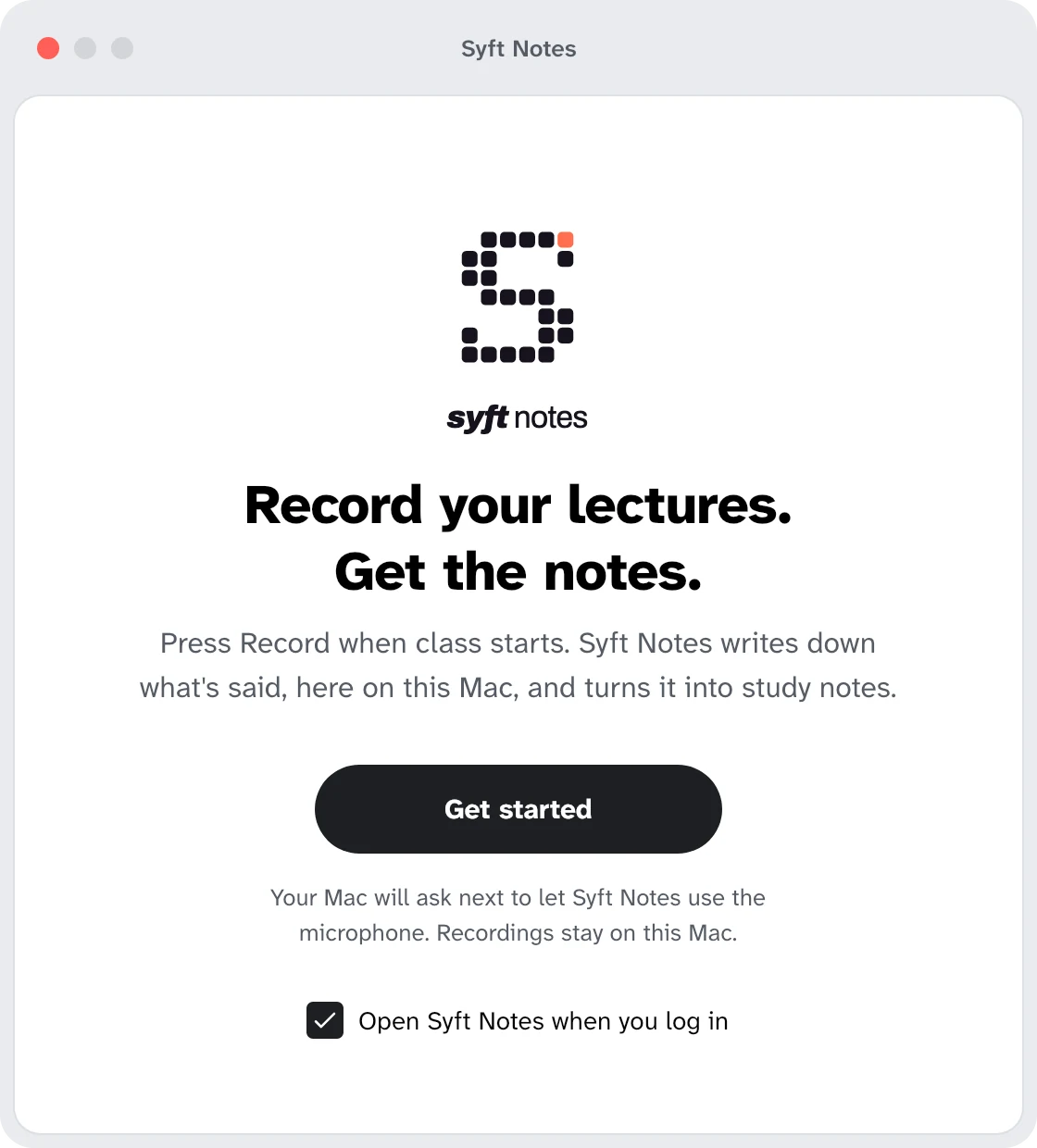
Syft Notes' first window: the pixel s and the syft notes wordmark, Record your lectures. Get the notes., a Get started button, and Open Syft Notes when you log in ticked.

Record

Every word, written down live.

Click Record on Home, in the menu bar or the tray, or press ⌥⇧R (Ctrl+Alt+R on Windows and Linux). Syft Notes writes the lecture down as it's said, on your own computer. The audio never leaves it.

  • Type your own notes while it records; the write-up is built round them
  • Pause or stop from the menu bar
  • Or have it written down after class, to save battery
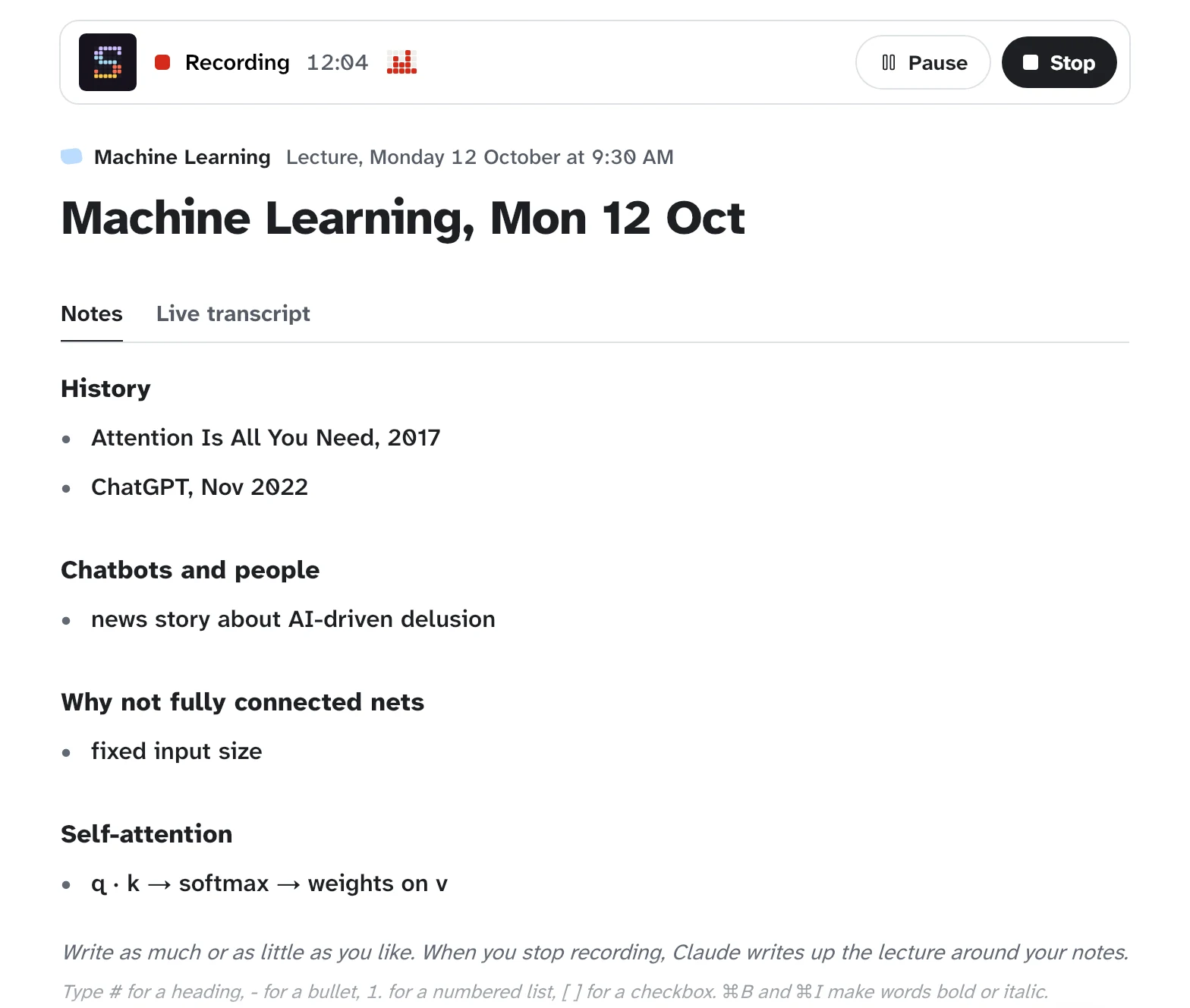
A Machine Learning lecture being recorded: the recording bar with its time, the sound level, Pause and Stop, and the student's own notes typed under Notes as it records.

Notes

Written for you after class.

When you stop, the lecture is filed under its class and written up: a summary, key points, definitions and questions to review, by the AI you choose.

  • Filed under the right class, worked out from what was said
  • Fix or add to the notes yourself whenever you like
  • Plain Markdown files on your computer, one folder per class
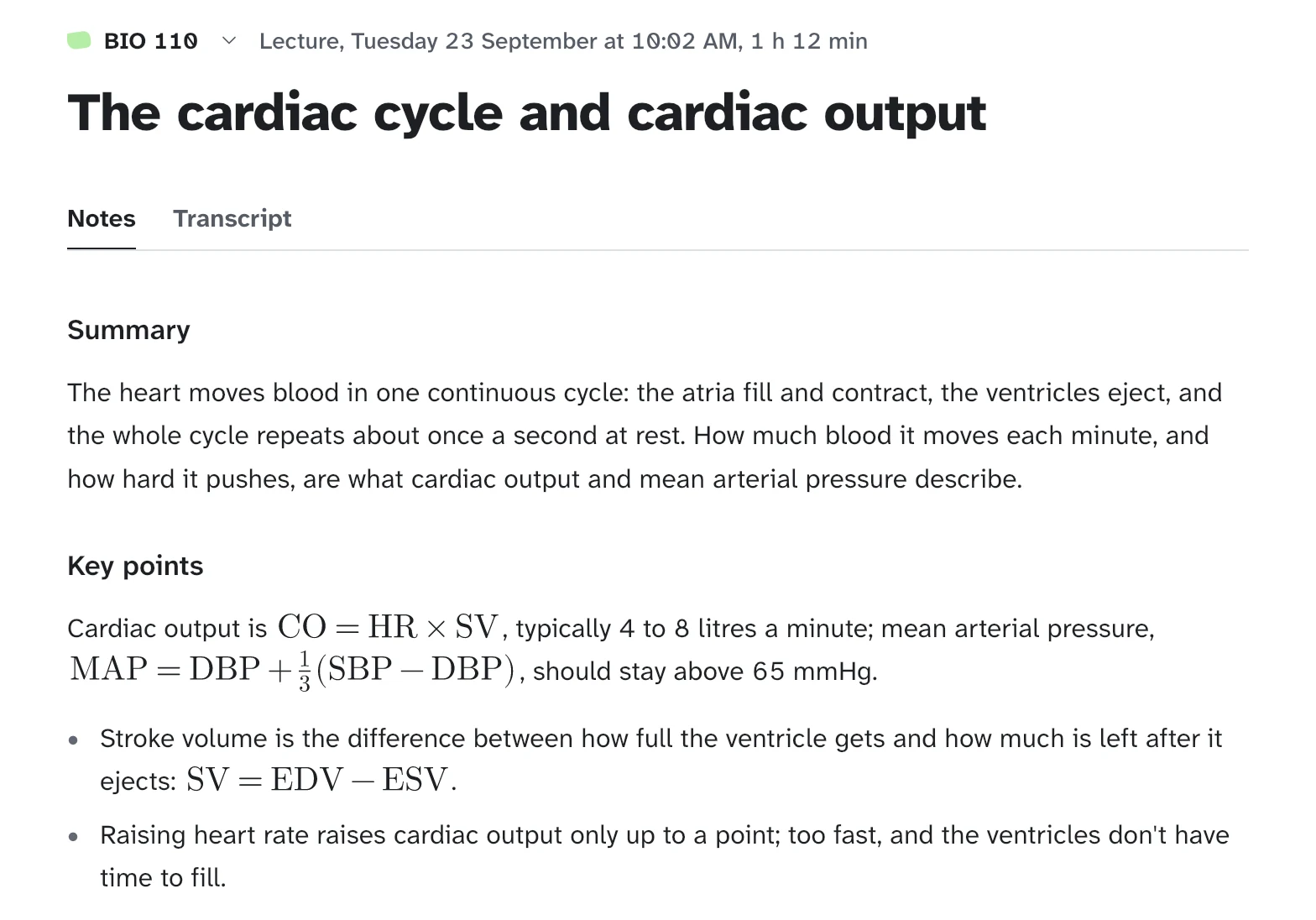
The notes for 'The cardiac cycle and cardiac output': a summary, then the key points, with cardiac output and mean arterial pressure written as formulas.

Free

Notes free with your Google account.

Your first lecture asks who should write its notes. Continue with Google writes them free with a personal Google account, through Gemini; a Claude or ChatGPT plan you already pay for works too, and so does a free AI on your computer (Ollama). After that one sign-in, notes come after every class.

  • You sign in on Google's own page; Syft Notes never sees your password
  • If the free allowance runs out, the notes come by themselves when it's back
  • Or copy and paste the lecture into any AI chat
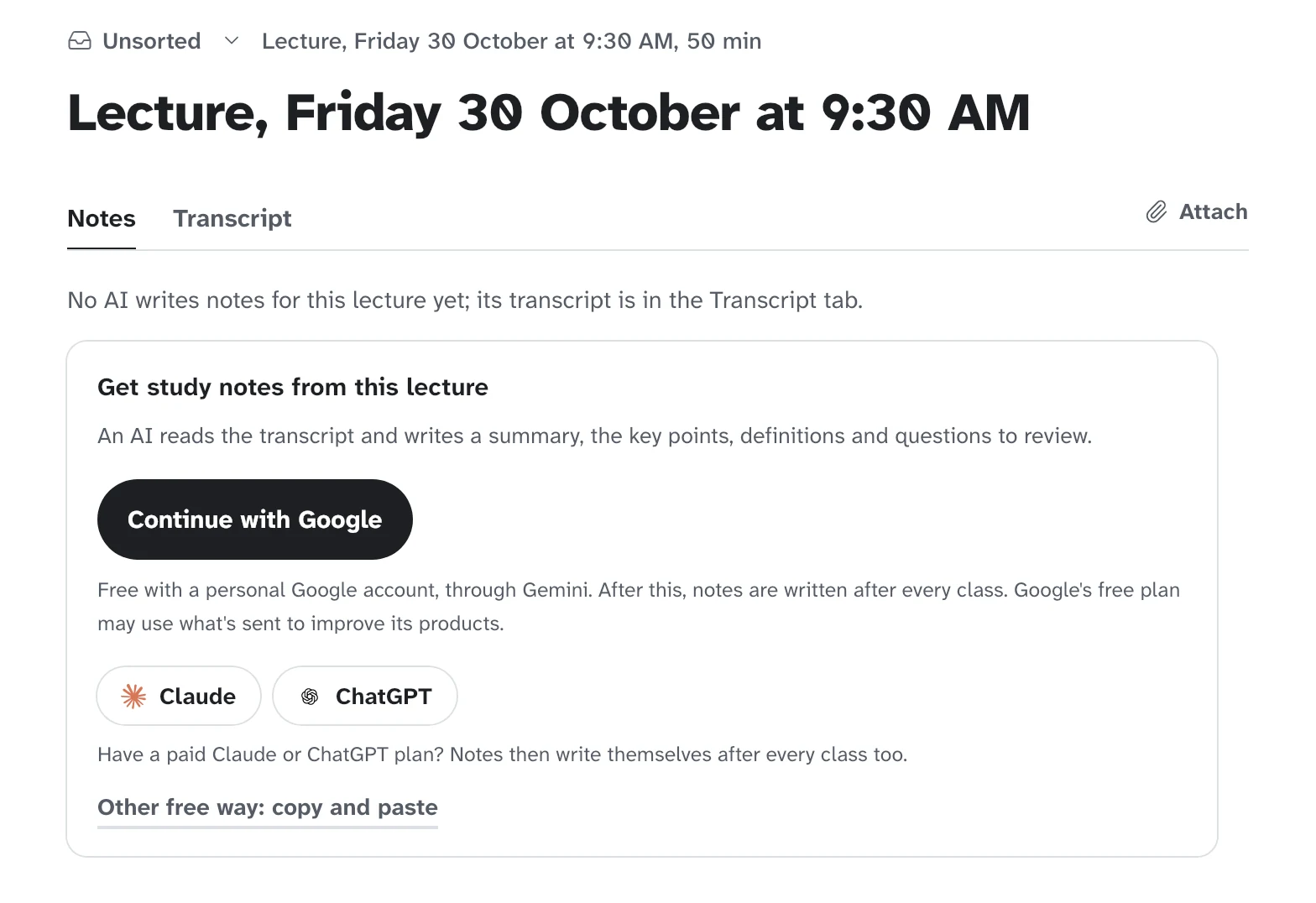
A first lecture's page: Get study notes from this lecture, with Continue with Google, then Claude and ChatGPT, and Other free way: copy and paste.

Formulas

Every formula, worked through.

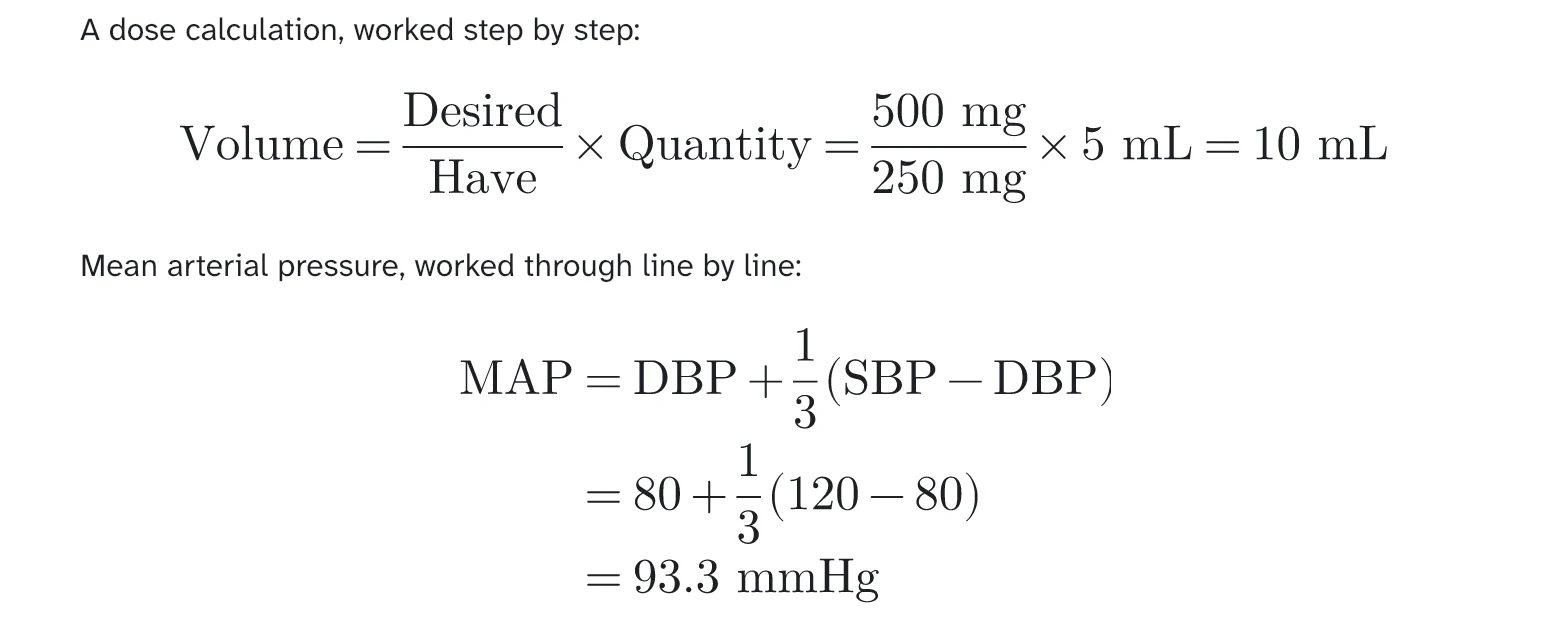
Maths is written the way it was on the board, in proper notation, with each step of a worked example in the order it was done.

Formulas in the notes: a dose worked out as desired over have times quantity, and mean arterial pressure worked through line by line to 93.3 mmHg.

Graphs

Drag a slider, watch it change.

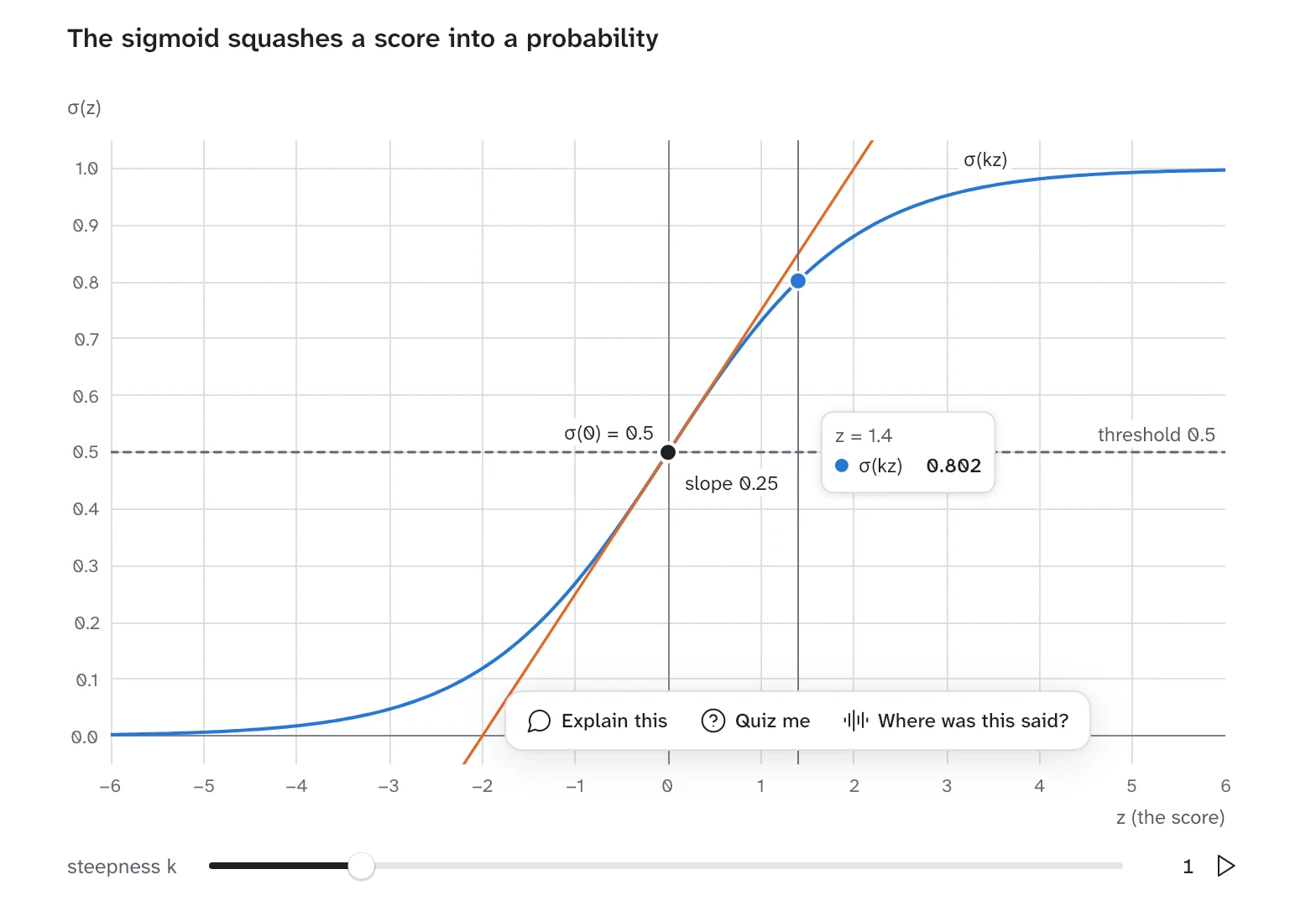
When a lecture is about a curve, the notes draw it from its formula. Move a slider, or press play, and see what each number does.

A graph in the notes: the sigmoid with its tangent at zero and a reading pinned on the curve, Explain this, Quiz me and Where was this said?, and a slider for its steepness.

Diagrams

Click a step to follow it.

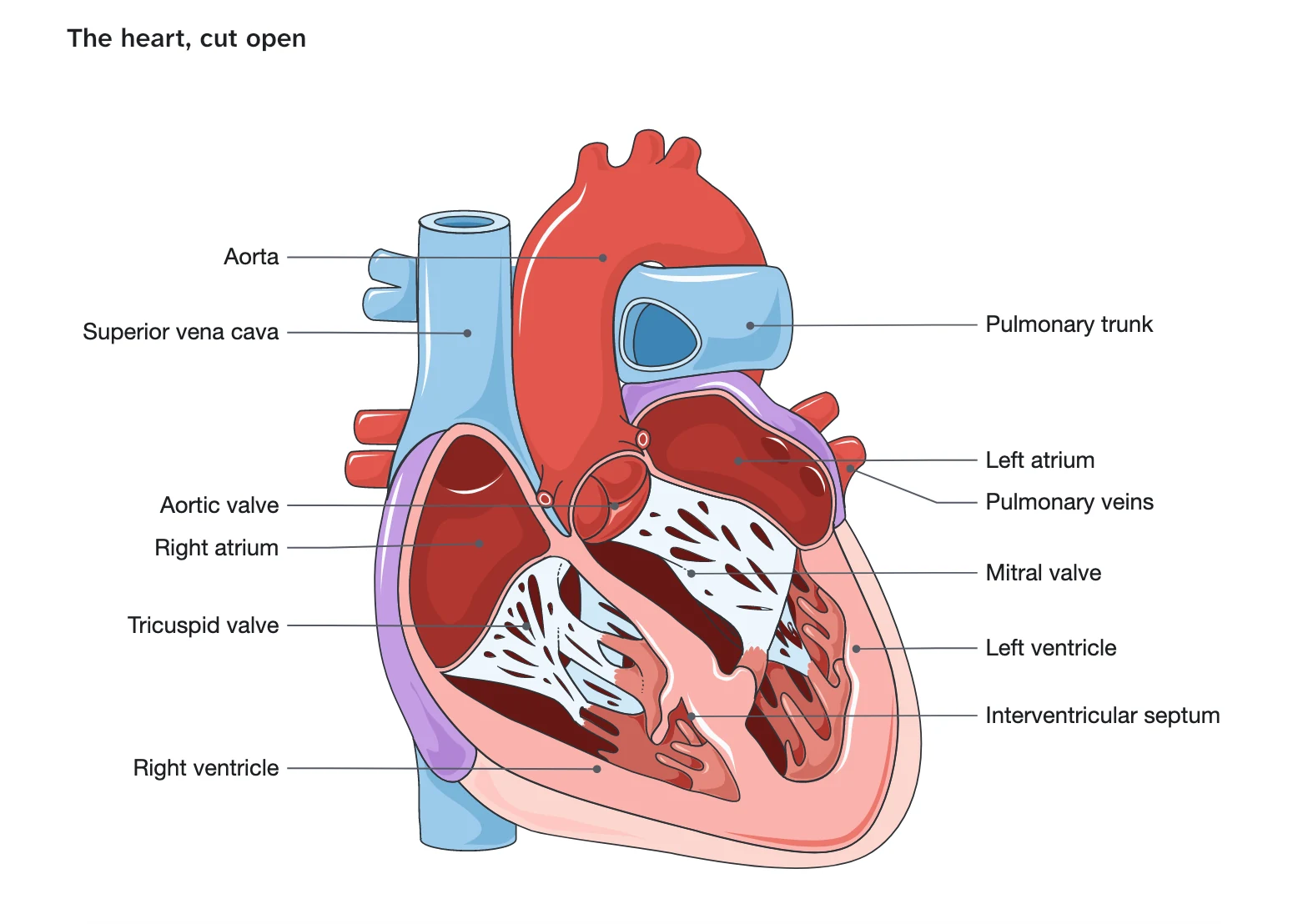
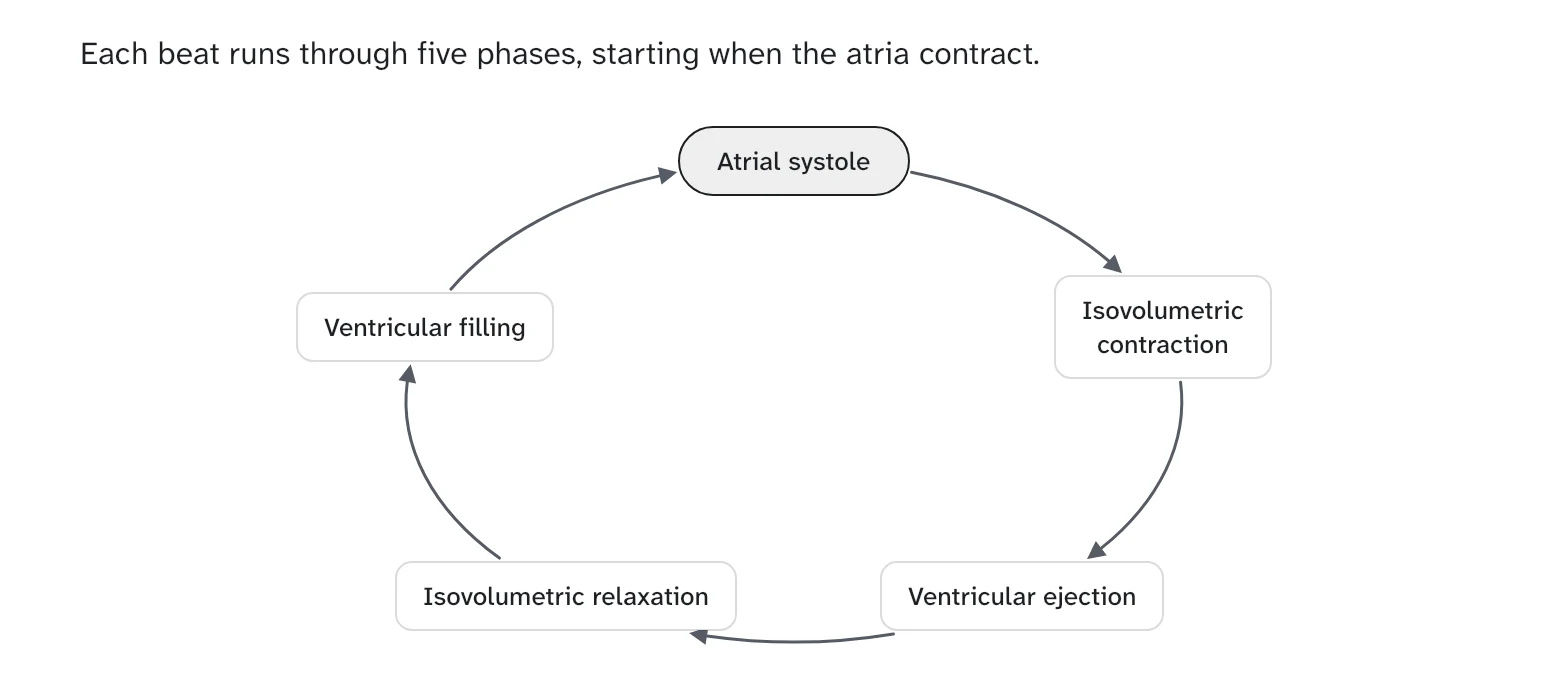
A process becomes a diagram you can click through, and anatomy becomes a labelled drawing, made from what your lecturer said.

  • Click a box to follow its arrows
  • Ask about any part: Explain this, Quiz me, or Where was this said?
A labelled drawing of the heart cut open in the notes: the aorta, the superior vena cava, both atria and ventricles, the valves and the pulmonary veins.
A diagram of the five phases of the cardiac cycle as a loop of boxes joined by arrows.

Due dates

Pulled in from Canvas for you.

Syft Notes reads Canvas through your browser with your own sign-in, so there's no password or token to hand over, and it only reads. Nothing on Canvas changes.

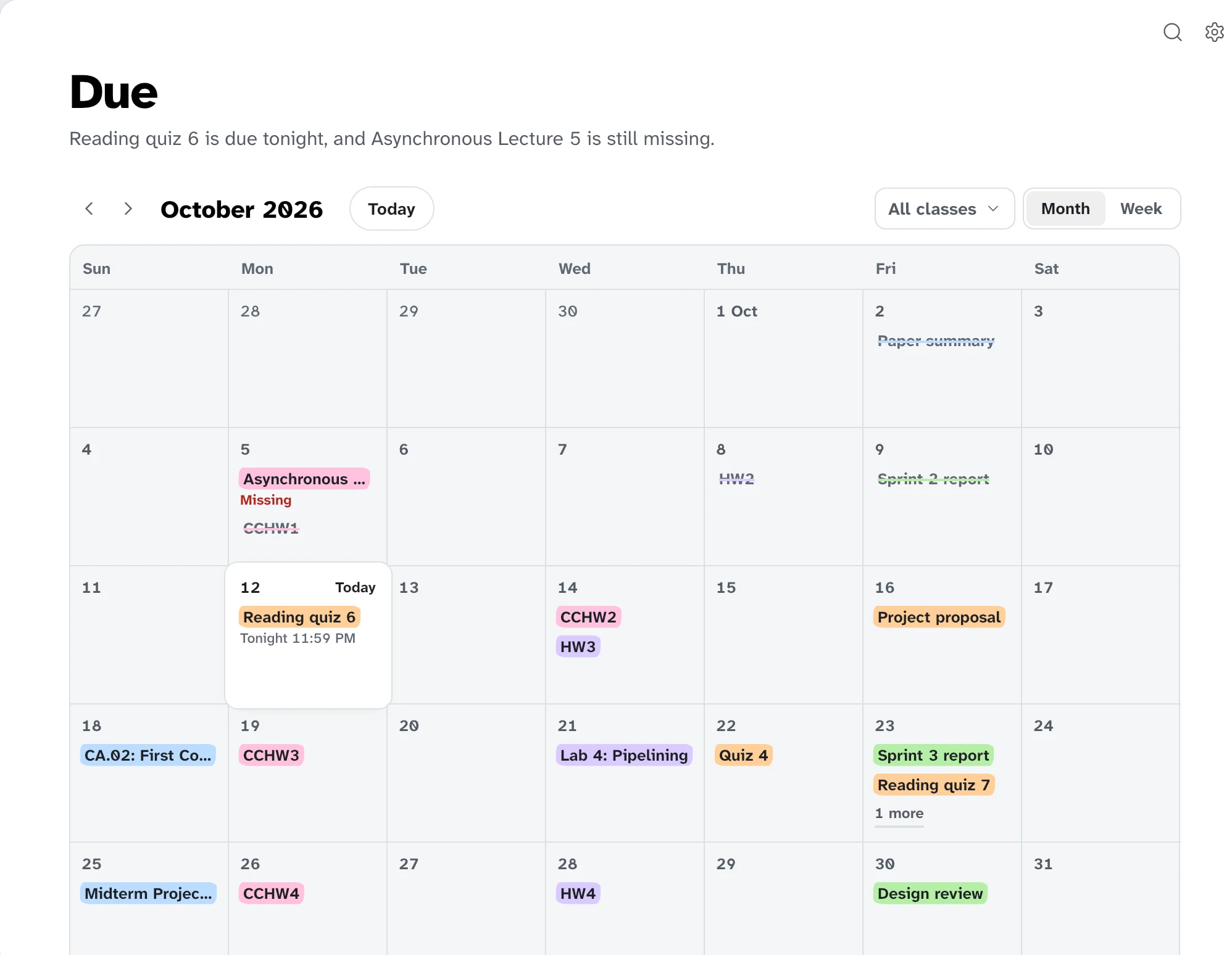
  • Everything due across your classes, as a calendar
  • Each assignment's instructions and rubric, your submissions and feedback
  • Works in Chrome and the browsers built on it, such as Edge and Brave
  • And in Firefox 140 or later and the browsers built on it, such as Zen, with the add-on from Mozilla's site
The Due page: October as a calendar, with each class's assignments, quizzes and projects on the days they're due, in the class's colour, and what's missing.

Ask

Answers from your own lectures.

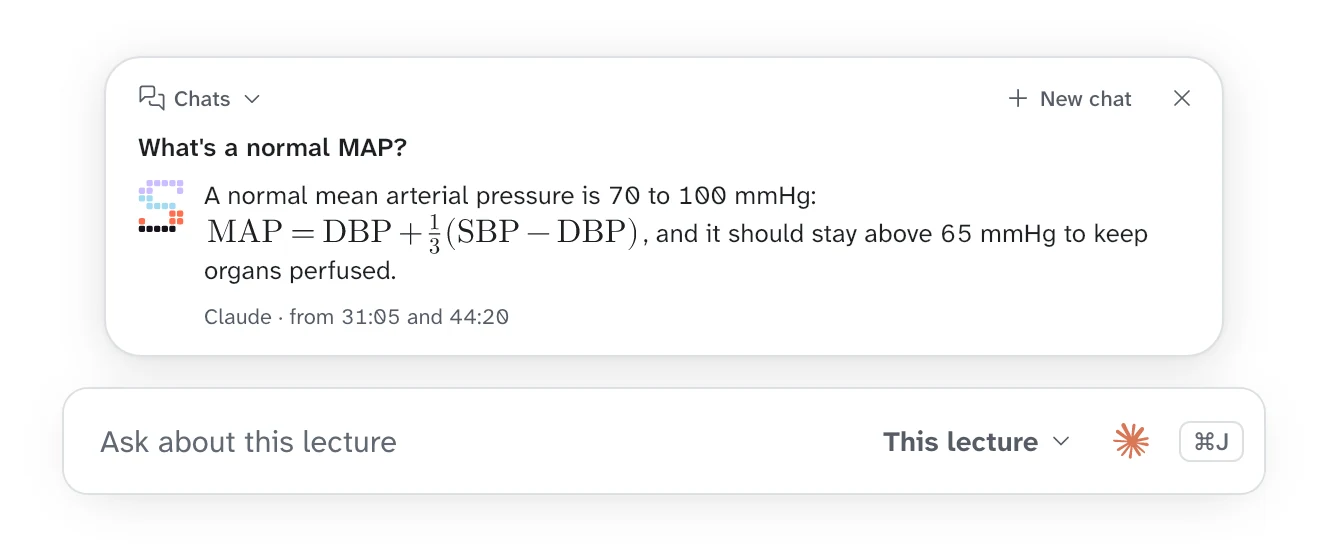
Ask about one lecture, a class, or all of them. The answer comes from your own notes, with the lecture and the minute it was said.

  • An Ask bar on Home, on every class and under every lecture's notes
  • The quick panel from anywhere: ⌥Space on a Mac, Alt+Shift+Space on Windows and Linux
  • Answers appear as they're written
An answer to 'What's a normal MAP?': 70 to 100 mmHg, with its formula, from Claude, with the minutes of the lecture it came from, above the Ask bar.

Connect

Works with Claude, ChatGPT and Gemini.

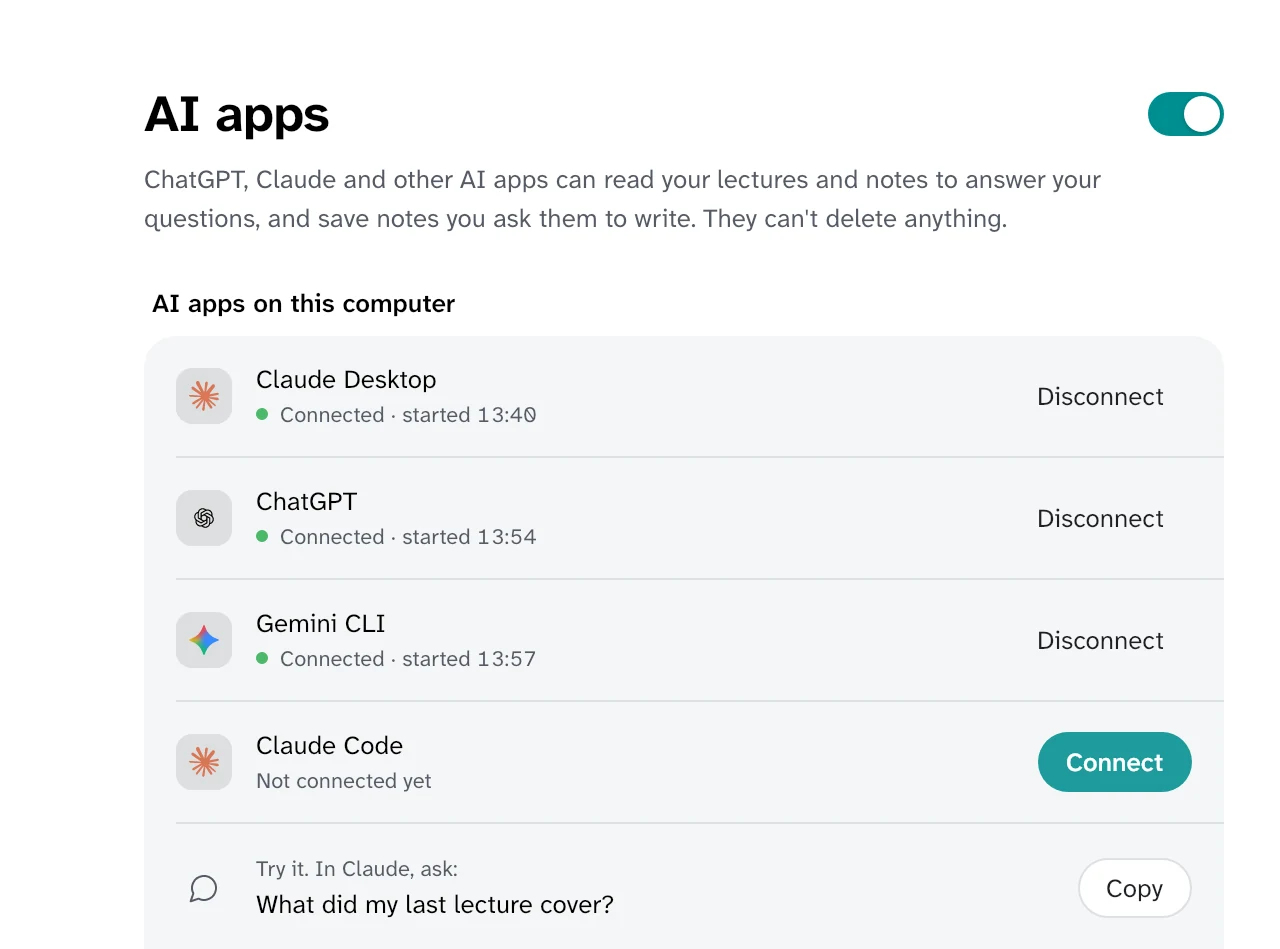
Turn it on in Settings, and the Claude, ChatGPT and Gemini apps on your computer can read your lectures and notes to answer your questions. They can't change or delete anything.

  • One Connect button for each app, nothing to type or paste
  • You choose what they can read: lectures, notes, Canvas
Settings, AI apps: Claude Desktop, ChatGPT and Gemini connected, Claude Code one Connect button away, and a question to try in Claude.

Your recordings never leave your computers.

  • Your audio never leaves.It's transcribed on the computer that recorded it.
  • No account, no server.There's no Syft Notes cloud. Your library is a folder on a computer you own, and your notes are Markdown files you can open, back up or sync however you like.
  • No tracking.The app doesn't track you or report on what you do. Once a day it sends one anonymous count (a random code for this copy, the app's version, and Mac, Windows or Linux) so we know how many people use it. You can turn it off in Settings. Nobody at Syft Notes can see your lectures.
  • You choose the AI.Notes are written by Claude or ChatGPT with the plan you already have, or free by Gemini with your Google account, only once you pick one. A free AI that runs on your computer is there too, in Settings.
  • Canvas and calendars are read-only.Canvas is read with your own sign-in and a calendar through a link you paste. Syft Notes changes nothing. What it reads goes only to your library.
  • Open source.Every line is on GitHub, so you don't have to take our word for any of this.

The details are in the privacy policy.

Your library in your pocket.

Read your notes, ask a question and see what's due from your phone. iPhone and iPad: coming soon. Android, and iPhone until then, can use the web app your own library serves.

Get the phone app

Free, for Mac, Windows and Linux.

The same app for every computer, and setup is one button. It comes in light and dark, or follows your computer's, and keeps itself up to date, never while it's recording.

Mac

This computer

Needs macOS 15 or later. Open the DMG and drag Syft Notes onto Applications (or just open it: it offers to move itself there). It's signed and notarized by Apple, so it opens like any app from the internet. Allow the microphone when it asks.

Download Syft-Notes.dmg

Windows

This computer

Open the Setup.exe. It installs for your account only, with no questions and no admin rights, then opens Syft Notes by itself. If Windows says "Windows protected your PC", click More info, then Run anyway.

Download SyftNotes-win-x64-Setup.exe

Linux

This computer

Needs a desktop with PipeWire or PulseAudio (Ubuntu, Fedora, Debian, Mint and the like). It's an AppImage: allow it to run (Properties in your file manager) and open it. Syft Notes puts itself in your applications menu, updates itself, and waits in your desktop's tray. No root needed. If it doesn't open, your system needs FUSE: on Ubuntu 22.04 and Debian, sudo apt install libfuse2; on Ubuntu 24.04, libfuse2t64.

Download for x64 ARM64

Every update is checked against the release's own checksum before it installs. Prefer a terminal? The install commands are in the README. Record only where you're allowed to: many schools and places need everyone's consent.

Coming from Granola? See how Syft Notes compares.

Syft Notes is free. If it helps you, buy us a coffee.